auto_awesome
AI data analysis shows your next move
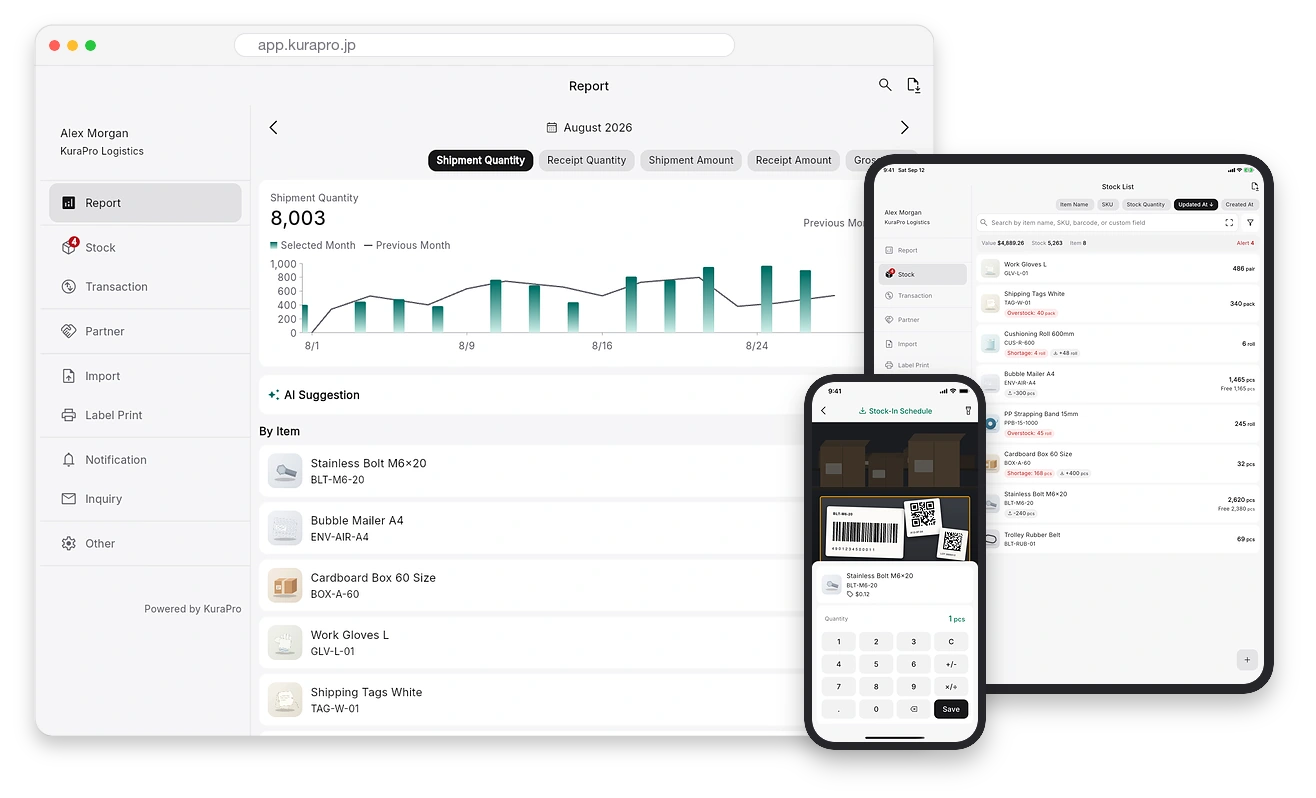
Pick a period and AI analyzes how stock and profit moved, then names the products to watch and what to do next. Its AI assistant answers how-tos 24/7.

 Cloud Inventory Management
Everything you need to manage inventory Easy for anyone, with stock shared in real time
15,000+
companies onboard
99%
paid retention rate


Trusted by many companies


























FEATURES
Pick a period and AI analyzes how stock and profit moved, then names the products to watch and what to do next. Its AI assistant answers how-tos 24/7.
No handheld scanner needed. Scan with your phone camera to record inbound, outbound and stocktaking in seconds, and see the same stock from PC or tablet.
Just set a minimum and maximum level per product. Shortages, overstock, expired and expiring stock are all detected automatically, before they cost you sales.
Choose moving-average or standard costing and stock value and gross profit are calculated for you. ABC analysis of outbound results shows what to prioritize.
Track stock separately by location (shelf, floor), lot and expiry (best-before) date. First-in-first-out is easy, with traceability ready for recalls.
Turn an inbound task into a purchase order and an outbound one into a delivery note. Pick date, tax and honorific, and the PDF is ready to send in seconds.
Split stock by site (warehouse, store) while one product master stays shared with your team. Every entry appears on everyone's screen at once — no waiting.
Import Excel workbooks (.xlsx, .xlsm) and CSV files just as they are, and export back to either format. Migration and daily backups take minutes, not days.
Add your own fields (text, number, date, barcode) to products and tasks. Colors, sizes, control numbers — keep managing things exactly the way you do now.
HOW STOCK MOVES
Inbound, outbound, move, adjustment and stocktaking. Record these five and your stock counts, costs and reports keep themselves up to date.
USE CASES
Manage your online store's stock in real time, right at hand. Accurate visibility prevents lost sales and mis-shipments.
Track stock by lot and best-before date. First-in-first-out prevents expiry losses, with traceability ready for recalls.
Strictly manage stock by expiry date and lot number. Prevent use of expired items and ensure quality control and lot-level tracking.
Link backroom and shop-floor stock instantly with barcodes. Cut stocktaking time dramatically and focus on customers.
Keep parts and materials at the right level with alerts. Manage down to lot and cost to curb wasteful ordering and improve cash flow.
Record stock on the spot by phone across multiple sites. Run accurate inbound, outbound and stocktaking, and see inventory across sites in one place.
HOW IT WORKS
STEP 1
Start instantly with just an email address. No setup fees whatsoever.
STEP 2
Add items one by one on your phone, or bulk-import from Excel or CSV on your PC.
STEP 3
Then just scan barcodes with your phone. Inbound and outbound management starts right away with simple operation.
WHY KuraPro
closeTypical tools lock lot, expiry and cost management behind expensive higher-tier plans.
checkKuraPro offers all key features on every paid plan — lot, expiry and cost management plus AI data analysis included — from $29/month, with no compromise on functionality (higher plans use a more capable AI model).
closeMost inventory tools stop at “how many do we have now” — and leave the judgment to you.
checkKuraPro includes cost, gross profit and ABC analysis as standard, and its AI analyzes the changes to suggest what to do next.
closeSome services require costly handheld terminals, setup fees and complex configuration.
checkAll you need is a smartphone. Zero setup fee and live in as little as 5 minutes.
closeTied down by price hikes, feature limits or complicated pricing?
checkMigrate your existing data straight from an Excel workbook or CSV. Move to KuraPro — all features at simple pricing.
VOICES
We switched over from managing inventory in Excel. Stocktaking now takes less than half the time, and alerts let us catch shortages before they happen.
Managing stock by best-before date and lot has become so much easier. First-in-first-out is now consistent, and expiry losses have visibly dropped.
It's just scanning with a phone, so even new staff picked it up right away. Not having to buy dedicated terminals was a big plus too.
* From our customer survey
PRICING
Free for up to 50 products, 1 user and 1 location.
Ideal for small online shops
Accelerate your growing business
For multi-site, large-scale operations
* Higher-tier plans use AI models that handle more advanced analysis.
FAQ
It refers to the number of distinct product types (items) you can register, not the quantity in stock. For example, even with 10 “T-shirts (white, size M),” that counts as 1 product.
A “site” is a large management unit that holds its own independent inventory. Stock levels and transaction data such as inbound/outbound are managed separately per site, while the product master is shared across all sites. A “location,” on the other hand, is a field that shows where within a single site an item is stored (shelf, room, floor and so on). For example, you can separate “Tokyo Warehouse” and “Osaka Warehouse” as sites, and manage “Shelf A” and “Shelf B” within them as locations.
Yes, you can change your plan anytime from the admin screen. Your accumulated data carries over as-is.
In addition to credit cards, Apple Pay and Google Pay are supported. Customers on an annual plan can also pay by invoice via bank transfer. Payments are processed by Stripe, which is certified to PCI DSS Level 1, and card details are never stored on KuraPro's servers.
Yes, you can cancel anytime from the admin screen. Canceling a paid plan does not delete your data — your account is simply downgraded to the free plan and your data is kept. If your usage exceeds the free plan's limits, a limit alert appears when you try to add new work. If you subscribe again, you can continue using your existing data as-is.
Yes. Bulk import from Excel (.xlsx, .xlsm) and CSV (.csv) files is supported. Upload your existing Excel workbook as-is, or export CSV from your current system, and migrate smoothly.
Yes. Separate independently operated units such as warehouses and stores as “sites,” and manage shelves, rooms and floors within a site using the Locations feature — all with real-time, centralized stock control.
Yes. Inventory management by lot and expiry (best-before) date is supported. You can track the same product separately by lot or date — useful for expiry management and traceability in food, cosmetics, pharmaceuticals and more. You can toggle it on/off anytime in settings.
Yes. You can create a purchase order PDF from an inbound transaction and a delivery note PDF from an outbound one. You can set the issue date, tax handling, tax rate, honorific, listed columns and remarks; the client is printed as the recipient and your own company details as the issuer.
Yes. Choose between moving-average and standard costing, and asset value and gross profit are calculated automatically from your inbound/outbound records. If you don't need cost management, you can switch to quantity-only management.
Pick a period on the report screen and AI analyzes how inbound, outbound and gross profit changed, then points out the products to watch and suggests what to do next (paid plans only). The in-app AI assistant also answers questions about operations and errors on the spot, 24/7, and passes requests and bug reports straight to our team.
Yes. You can freely add custom fields (text, number, date, barcode and more) to products and tasks. Manage color, size, notes and anything else tailored to your industry.
No. You can use your own smartphone camera as a scanner, so there's no need to buy dedicated equipment.
Yes. We use AWS with 24/7/365 monitoring and automatic backups.
Yes. All communication is encrypted with SSL/TLS (HTTPS). We operate on AWS and protect your important data through access control and regular security audits.
KNOWLEDGE
Plain-language tips on inventory management you may not know — start with these key topics.

A plain-language guide to inventory turnover. How to calculate the turnover ratio and days of inventory, how to think about benchmarks by industry, what high vs low turnover means, ways to improve it, and how to track it with outbound data in an inventory system.

A plain-language guide to ABC analysis in inventory management. Its link to the Pareto principle, the steps to split items into A/B/C ranks, the management policy per rank, cautions, and how to visualize best sellers with an inventory system's ABC analysis.

A plain-language guide to appropriate (optimal) inventory. The downsides of excess and shortage, how to find the right level (safety stock, reorder point, maximum), points for maintaining it, and how to hold the right level with min/max levels and alerts in an inventory system.
Get started today
Solve stock-outs, overstock and stocktaking headaches. Try the inventory management chosen by 15,000+ companies — free.
Free plan available · Set up in 5 minutes · No card required
15,000+
companies
99%
paid retention
* Companies as of June 2026; paid retention over June 2025–June 2026
CONTACT